Your SASSA grant is active, money keeps arriving but your circumstances changed. Whether you found work or your income shifted, cancelling correctly protects your future government record.
Quick Answer: To cancel a SASSA SRD grant online in 2026, visit srd.sassa.gov.za/sc19/cancellation, enter your 13-digit ID number and registered mobile number, verify with a one-time PIN, and confirm cancellation. SASSA processes the request within 7 business days. For help, call 0800 60 10 11 (toll-free).
Why Would You Want to Cancel Your SASSA Grant?
Many South Africans who receive the Social Relief of Distress (SRD) grant of R370 per month reach a point where they no longer qualify or no longer need it.
Common reasons include:
- Starting a new job or earning income above the means-test threshold
- Receiving another government grant or social benefit
- Wanting to correct an error in your application
- Needing to reapply with updated personal details
According to the South African Social Security Agency (SASSA), beneficiaries are legally required to report any change in financial circumstances. Failing to do so can result in overpayment recovery or disqualification from future benefits.
Cancelling properly keeps your record clean especially important if you ever apply for a government job, a housing subsidy, or another social grant.
How to Cancel Your SASSA SRD R370 Grant Online in 2026?
The online method through the SASSA SRD portal is the fastest and most convenient option. You do not need to visit a SASSA office.
Before You Begin: What You Will Need
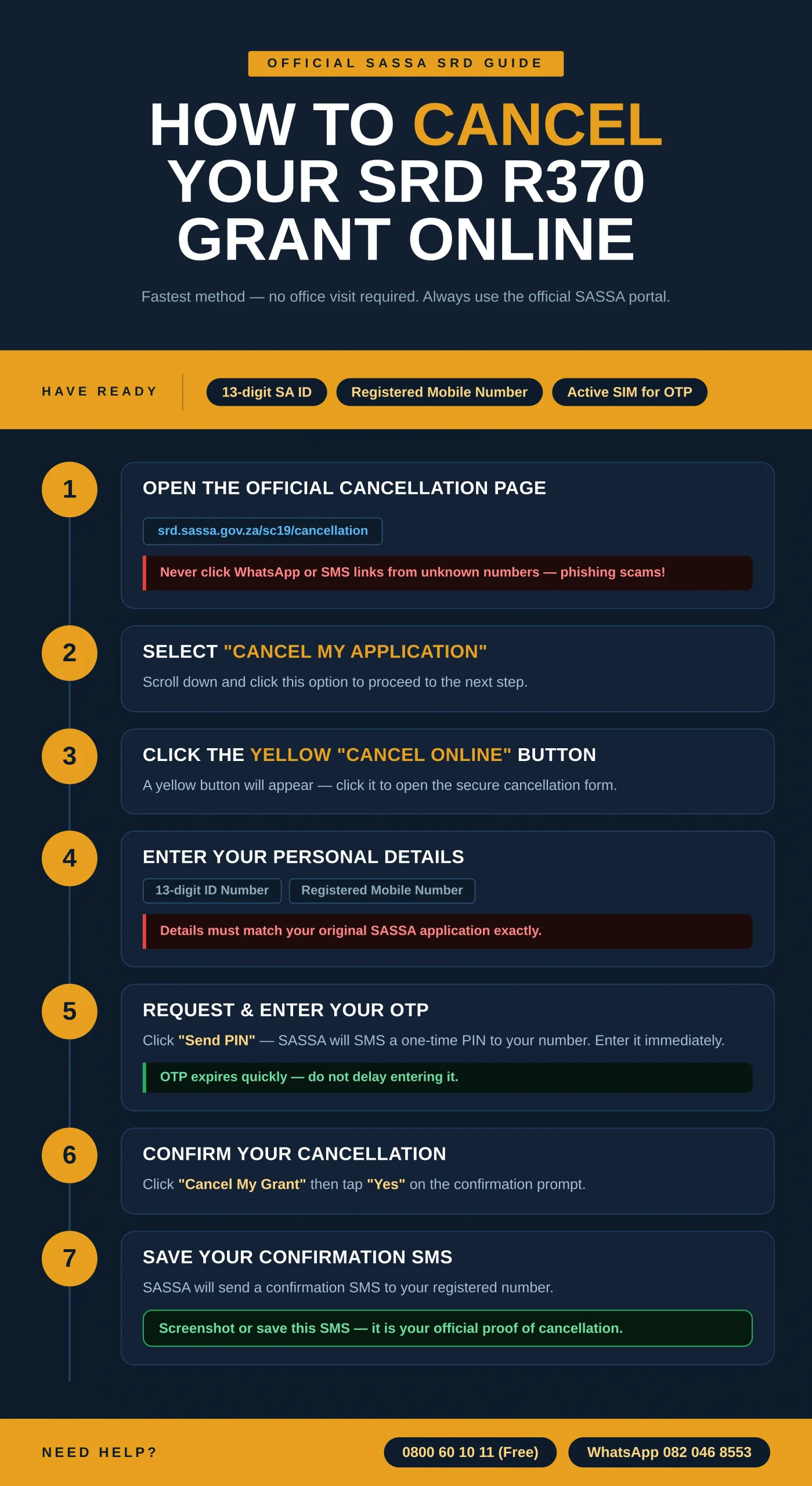
- Your 13-digit South African ID number
- The mobile number you registered with SASSA
- An active mobile connection to receive a one-time PIN (OTP)
Step 1: Open the Official SASSA SRD Cancellation Page
Go to https://srd.sassa.gov.za/sc19/cancellation in your browser. Always use the official SASSA website to avoid phishing scams. Do not use links sent via WhatsApp or SMS from unknown numbers.
Step 2: Select “Cancel My Application”
Scroll down the page until you see the “Cancel My Application” option. Click on it to move to the next step.
Step 3: Click the Yellow “Click Here to Cancel Online” Button
A yellow button will appear on screen. Click it to open the secure online cancellation form.
Step 4: Enter Your Personal Details
Fill in your 13-digit ID number and your registered South African mobile number. These must match exactly what you submitted in your original SASSA SRD application.
Step 5: Request and Enter Your One-Time PIN
Click “Send PIN.” SASSA will SMS a one-time PIN to your registered number. Type this PIN into the field provided. The PIN is valid for a limited time, so do not delay.
Step 6: Confirm Your Cancellation
Once your PIN is verified, click “Cancel My Grant.” A confirmation prompt will appear. If you are sure, click “Yes” to finalise your request.
Step 7: Save Your Confirmation SMS
SASSA will send a confirmation SMS to your registered number acknowledging your cancellation request. Keep this message as proof.
How Long Does SASSA Take to Process a Cancellation?
| Stage | Timeframe |
| Cancellation request submitted | Immediately (online) |
| SASSA review and processing | Up to 7 business days |
| Final payment (if already scheduled) | May still be paid once |
| Payments stopped | After processing is complete |
You can track your status at any time on the SASSA SRD status check portal. If nothing has changed after 7 business days, call SASSA on 0800 60 10 11.
How to Reinstate a Cancelled SASSA SRD Application?
Did your financial situation change again after you cancelled? You can reinstate your application through the same portal without starting from scratch.
Step 1: Go Back to the SASSA SRD Website
Visit https://srd.sassa.gov.za/sc19/reinstate and select “Cancel My Application” again. Do not be confused by the label — this section also handles reinstatement.
Step 2: Look for the Reinstatement Option
After the cancellation screen loads, you will see the option: “Reinstate my cancelled grant application?” Click on this link.
Step 3: Enter Your ID Number and Mobile Number
Type in your 13-digit ID number and the cell phone number linked to your application. Double-check both before continuing.
Step 4: Request Your PIN
Click “Send PIN” and wait for the OTP on your phone.
Step 5: Verify Your PIN
Enter the PIN and click “Verify PIN” or press Enter.
Step 6: Accept the Terms and Reinstate
Tick the checkbox to agree to SASSA’s terms and conditions. Then click “Reinstate My Grant” and confirm by selecting “Yes.”
Your reinstated application will go through the standard SASSA eligibility review before payments resume.
Common Problems When Cancelling Online — and How to Fix Them
| Problem | Likely Cause | Solution |
| Website won’t load | Browser cache or server load | Clear your browser cache or try a different browser |
| OTP not received | Incorrect mobile number entered | Recheck your number; if correct, wait 5 minutes and retry |
| Details do not match | ID or number differs from SASSA records | Visit your nearest SASSA office to update your details |
| Cancellation stuck after 7 days | Processing delay | Call SASSA on 0800 60 10 11 or visit srd.sassa.gov.za |
| No confirmation SMS received | Network issue or number change | Screenshot the final page as proof and follow up with SASSA |
Can You Cancel a SASSA Grant by Phone or In Person?
Yes. If the online method does not work for you, SASSA offers two alternatives:
By phone: Call the SASSA toll-free helpline at 0800 60 10 11, available Monday to Friday during office hours. A SASSA agent will guide you through the cancellation process.
In person: Visit your nearest SASSA local office. Bring your green barcoded ID book or smart ID card. Use the SASSA office locator on their official website to find your closest branch.
Conclusion
Cancelling your SASSA SRD grant online in 2026 is a straightforward process if you follow the correct steps on the official srd.sassa.gov.za portal.
The key is to use the right website, enter accurate details, and save your confirmation SMS. Processing takes up to 7 business days. If you need help, SASSA’s toll-free number 0800 60 10 11 is your best resource.
Frequently Asked Questions
1. Can I cancel my SASSA Grant from my phone?
Yes. The SASSA SRD cancellation page is mobile-friendly. Open your browser, go to srd.sassa.gov.za/sc19/cancellation, and follow the same steps.
2. Will I still receive a Payment after I cancel?
Possibly. If a payment was already scheduled before your cancellation was processed, you may receive one final disbursement.
3. Does cancelling my SRD grant affect other SASSA grants?
No. Cancelling your SRD (R370) grant does not affect other grants such as the Child Support Grant or Old Age Pension.
4. What happens if I Cancel by mistake?
You can reinstate your cancelled SRD application through the same SASSA SRD portal using the reinstatement option.
5. Is there a fee to Cancel my SASSA grant online?
No. Cancellation through the official SASSA website is completely free. Be cautious of third-party websites or individuals who charge for this service.
6. How do I know my Cancellation was successful?
SASSA will send a confirmation SMS to your registered mobile number. You can also check your application status on srd.sassa.gov.za.
7. Can someone else Cancel my grant on my behalf?
SASSA requires your personal ID number and registered mobile number. For security reasons, the cancellation process is tied to your registered details. If you need assistance, contact SASSA directly on 0800 60 10 11.
8. What if my mobile Number has changed since I applied?
You will need to update your contact details with SASSA before you can complete the online cancellation. Visit your nearest SASSA office with your ID to do this.