SASSA Status Check (also known as SRD Status Check or R370 Status Check) is the official South African Social Security Agency service allowing South African citizens to confirm their social welfare and unemployment relief grant application status online.
Official Website — Secure & Verified · srd.sassa.gov.za
Head to the official South African Government portal at https://srd.sassa.gov.za/SC19/STATUS, enter your South African ID number and registered cellphone number, then hit Submit. Your SRD R370 Grant status, approved, pending, or declined, appears instantly.
What Is SASSA Status Check?
SASSA Status Check, also known as SRD Status Check or R370 Status Check, is a free online welfare service provided by the South African Social Security Agency. It allows South African citizens and permanent residents to confirm the outcome of their Social Relief of Distress (SRD) Grant application.
The SRD R370 Grant was introduced by the South African Government in May 2020 to support unemployed citizens during the COVID-19 pandemic. It has since been extended and remains one of the most widely accessed social welfare programmes in South Africa.
As of 2026, over 13 million to 17 million South Africans apply for the SRD R370 Grant each month. However, According to Africacheck.org only roughly 9 Million people receive R370 Grant. The Department of Social Development and SASSA manage this grant through the official portal at http://srd.sassa.gov.za/SC19/STATUS.
How to Check Your SASSA SRD Status Online
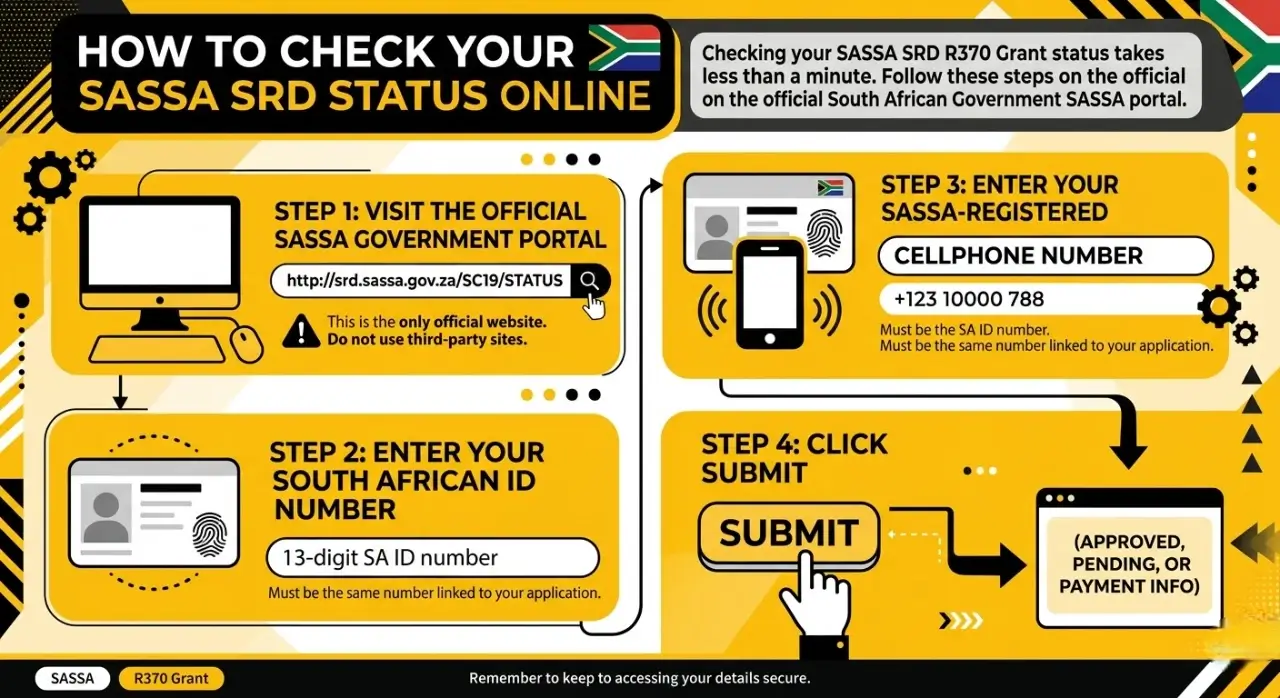
Checking your SASSA SRD R370 Grant status takes less than a minute. Follow these steps on the official South African Government SASSA portal.
Step 1 — Visit the Official SASSA Government Portal
Open your browser and go to http://srd.sassa.gov.za/SC19/STATUS. This is the only official SASSA website for SRD status checks. Do not use any third-party website to enter your personal details.
Step 2 — Enter Your South African ID Number
Type your 13-digit South African ID number in the field provided. Make sure there are no spaces or errors. SASSA uses your ID number to match your application in their system.
Step 3 — Enter Your SASSA-Registered Cellphone Number
Enter the cellphone number you used when you applied for the SRD R370 Grant. This must be the same number linked to your SASSA application. If you changed your number, you need to update it with SASSA first.
Step 4 — Click Submit
Hit the Submit button. Your SASSA SRD Grant application status appears immediately on screen.
However, If you no longer have access to your registered Cell Phone number, read our guide on how to check your SASSA status without a phone number for the exact steps that still work.
What Does Your SASSA SRD Status Mean?
When you perform a SASSA Status Check for the SRD R370 Grant, the result tells you exactly where your application sits in the verification process. The system cross-checks your South African ID number against SARS, UIF, NSFAS, and the Department of Home Affairs databases every month.
Here is what each status means and the exact action you need to take.
1. Approved
What it means: SASSA confirmed you meet all eligibility criteria — income below R624, no UIF payments, no other active government grant. You will see a payment date or a Payment ID alongside your approved status.
What to do:
- If a date appears, your funds will be available at your bank account or selected retail pay point — including Checkers, Shoprite, or Pick n Pay — within 2 to 3 working days of that date.
- If it shows Approved but no date, wait. Your payment is still being processed in the current batch.
2. Pending
What it means: SASSA received your application but the monthly verification is not yet complete. The system is still waiting for confirmation from SARS, UIF, the Department of Home Affairs, or your bank.
What to do:
- Wait. No action on your side will speed up a pending status.
- Check back weekly. If your status stays Pending for more than 90 days, call the SASSA toll-free helpline on 0800 60 10 11.
3. Declined
What it means: Your application was rejected for that specific month. Common reasons include Alternative Income Source Identified — meaning more than R624 entered your bank account — or your details matched a UIF or NSFAS record.
What to do:
- Appeal immediately. You must submit a separate appeal for every month you are declined.
- Submit your appeal through the official SASSA SRD Appeals Portal at https://srd.sassa.gov.za/sc19/appeals within 90 days of the declined decision.
4. Reapplication Pending / Bank Details Pending
What it means: Information is missing or a mismatch was detected. Either your annual reconfirmation is incomplete, or your banking details failed the verification check — your name on the bank account must match your South African ID exactly.
What to do:
- Log in to the official SASSA SRD portal at http://srd.sassa.gov.za and update your banking details.
- Make sure the account is registered in your own name. SASSA does not pay into another person’s account under any circumstances.
All SASSA SRD Status Meanings at a Glance
| Status | Meaning | Action Required |
| Approved | Grant approved for this period | Wait for payment date via SMS |
| Pending | Verification in progress | Check back weekly |
| Declined | Did not meet criteria this month | Appeal within 90 days |
| Alternative Income Identified | Another income source detected | Appeal with bank statements if incorrect |
| Income Identified | Earnings exceed R624 threshold | Reapply when income drops below R624 |
| Application Complete | Reapplication received successfully | Monitor status monthly |
| Bank Details Pending | Banking information missing | Submit bank details on SASSA portal |
| Reapplication Pending | Application not yet received | Apply on official SASSA website |
| Period Pending | Verification in progress for this period | Wait for outcome |
| Period Approved | Approved for current payment period | Expect SMS payment notification |
| Period Declined | Declined for this specific month | Appeal within 90 days |
| Cancelled | Grant has been cancelled | Contact SASSA on 0800 60 10 11 |
| Identity Verification Failed | ID does not match Home Affairs records | Verify details and resubmit |
| Duplicate Application | Multiple applications submitted | Wait for original application review |
| Fraudulent Application | Application flagged as suspicious | Contact SASSA fraud line immediately |
| Awaiting Reassessment | Application under re-evaluation | Submit any documents SASSA requests |
SASSA Status Check via Other Official Channels
Besides the official SASSA SRD portal at http://srd.sassa.gov.za/SC19/STATUS, the South African Social Security Agency offers multiple free channels to check your SRD R370 Grant status.
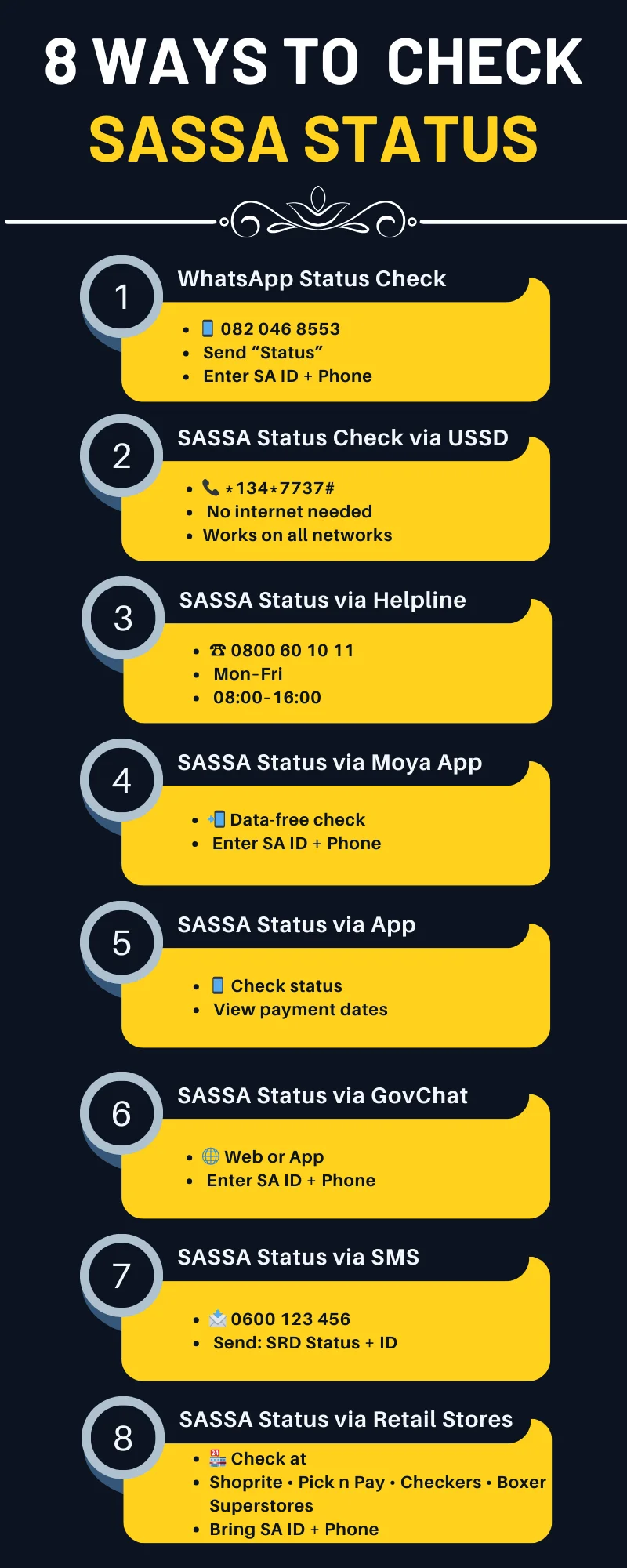
1. SASSA Status Check via WhatsApp — 082 046 8553
- Send a WhatsApp message to 082 046 8553
- Type “Status” and follow the on-screen prompts
- Have your 13-digit South African ID number and SASSA-registered cellphone number ready
2. SASSA Status Check via USSD — Dial *134*7737#
- Dial *134*7737# from your SASSA-registered cellphone
- Works on Vodacom, MTN, Cell C, and Telkom — no internet required
- Free to use on both smartphones and basic phones
3. SASSA Status Check via Toll-Free Helpline — 0800 60 10 11
- Call 0800 60 10 11 — free from any South African number
- Available Monday to Friday, 08:00 to 16:00
- A SASSA agent will confirm your SRD R370 Grant status and assist with queries
4. SASSA Status Check via Moya App — Data-Free Status Check
- Download the Moya App from the Google Play Store or Apple App Store
- Open the app and go to the SASSA SRD Grant services section
- Enter your South African ID number and registered cellphone number and tap Submit
- The Moya App works without mobile data — completely free
5. SASSA Status Check via SASSA Mobile App
- Download the official SASSA App from Google Play Store or Apple App Store
- Register using your South African ID number and cellphone number
- Select “Check SRD Status” from the menu
- The app also shows payment dates, appeal options, and banking detail updates
6. SASSA Status Check via GovChat — Website or App
- Visit GovChat or download the GovChat App
- Select the SASSA SRD Grant status check option
- Enter your South African ID number and registered cellphone number
- GovChat also provides updates on SRD R370 appeals and other South African Government services
7. SASSA Status Check via SMS — 0600 123 456
- Open SMS on your cellphone and send a message to 0600 123 456
- Type: SASSA SRD Status [Your 13-digit South African ID number]
- You will receive an SMS confirming your SRD R370 Grant status and payment date
8. SASSA Status Check via Partner Retail Stores — Shoprite, Pick n Pay
- Visit a SASSA-approved retail store such as Checkers, Shoprite, Boxer, or Pick n Pay
- Go to the till point or customer service desk and request a status check
- Provide your South African ID document and registered cellphone number
- If your payment is ready, you can collect it immediately at the store
SASSA SRD R370 Grant Payment Dates
SASSA releases SRD R370 Grant payment dates after 20th of each month. Payments are staggered in batches to reduce queues at pay points. Once your status shows Approved, watch the official SASSA website or your registered cellphone for your payment notification.
Payments are distributed through South African Post Office (SAPO) branches, SASSA-approved retailers, and direct bank deposits. SASSA sends an SMS to your registered cellphone when your payment is ready.
For June 2026, beneficiaries can expect payments to be issued after 20 June 2026, depending on verification and banking details. SASSA releases these funds in batches to ensure accurate eligibility checks.
Official Website — Secure & Verified · srd.sassa.gov.za
SASSA Payment Dates for 2026 to 2027
SASSA has released the 2026/2027 payment dates. Belo are the official dates for 2026 to 2027
| Month | Older Person’s Grant | Disability Grant | Children’s Grant |
| April 2026 | 02 April 2026 | 07 April 2026 | 08 April 2026 |
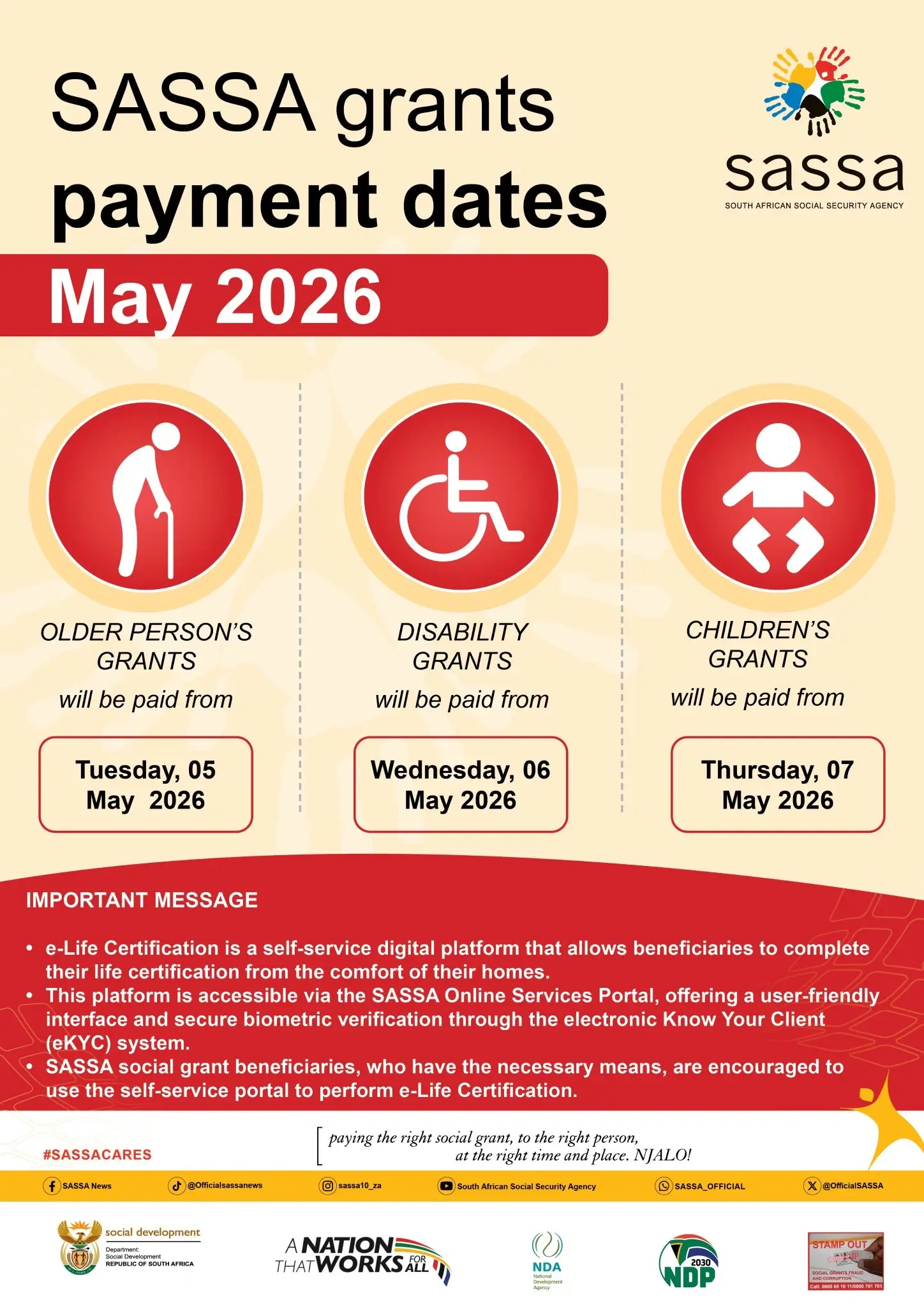
| May 2026 | 05 May 2026 | 06 May 2026 | 07 May 2026 |
| June 2026 | 02 June 2026 | 03 June 2026 | 04 June 2026 |
| July 2026 | 02 July 2026 | 03 July 2026 | 06 July 2026 |
| August 2026 | 04 August 2026 | 05 August 2026 | 06 August 2026 |
| September 2026 | 02 September 2026 | 03 September 2026 | 04 September 2026 |
| October 2026 | 02 October 2026 | 05 October 2026 | 06 October 2026 |
| November 2026 | 03 November 2026 | 04 November 2026 | 05 November 2026 |
| December 2026 | 02 December 2026 | 03 December 2026 | 04 December 2026 |
| January 2027 | 05 January 2027 | 06 January 2027 | 07 January 2027 |
| February 2027 | 02 February 2027 | 03 February 2027 | 04 February 2027 |
| March 2027 | 02 March 2027 | 03 March 2027 | 04 March 2027 |
SASSA Payment Dates for June 2026
The SASSA payment dates for June 2026 have been confirmed by the South African Social Security Agency to ensure an organized and stress-free payout process across South Africa. Payments are released in phases to reduce overcrowding and improve access.
| Grant Type | Payment Date |
| Older Person’s Grant | Tuesday, 02 June 2026 |
| Disability Grant | Wednesday, 03 June 2026 |
| Children’s Grants | Thursday, 04 June 2026 |
Beneficiaries are advised not to withdraw funds immediately on the first day. Your money remains safe in your account until you need it.
SASSA also encourages the use of its digital services, including the e-Life Certification portal, which allows beneficiaries to verify their details online without visiting offices.
SASSA Payment Amount Increases for April 2026
SASSA increased social grant payment amounts in April 2026. The next scheduled increase takes effect in October 2026, as announced by the South African Government.
| Grant Type | Amounts from October 2025) | Amount From April 2026 | Increase |
| Old Age Grant (60–74) | R2,320 | R2,400 | R80 |
| Old Age Grant (75+) | R2,340 | R2,420 | R80 |
| Disability Grant | R2,320 | R2,400 | R80 |
| Care Dependency Grant | R2,320 | R2,400 | R80 |
| War Veterans Grant | R2,340 | R2,420 | R80 |
| Foster Care Grant | R1,250 | R1,290 | R40 |
| Child Support Grant | R560 | R580 | R20 |
| Grant-in-Aid | R560 | R580 | R20 |
SASSA Grant Types
SASSA pays out 8 different grants, here is which one you qualify for and how much you get as of April 2026.
1. Old Age Grant — R2,400 to R2,420/month
- Citizens aged 60 to 74 receive R2,400 per month
- Citizens aged 75 and older receive R2,420 per month
- Must pass the SASSA means test — income and assets must fall below the threshold
- Reaches over 3.9 million South African pensioners every month
2. Disability Grant — R2,400/month
- For South African citizens with a medically proven physical or mental disability
- Requires a certified assessment from a registered doctor or specialist
- SASSA reviews this grant regularly to confirm the disability is still present
- Recipients who reach age 60 automatically move to the Old Age Grant
3. Care Dependency Grant — R2,400/month
- For parents or primary caregivers of children with severe disabilities who need full-time home care
- Child must be under 18 years old
- Requires a medical assessment confirming the child’s condition
- Cannot be combined with the Child Support Grant for the same child
4. War Veterans Grant — R2,420/month
- For South African veterans who served in World War II or the Korean War
- Applicant must be aged 60 or older
- Highest fixed SASSA grant amount currently paid
- Very few active recipients remain as this grant targets a specific historical group
5. Child Support Grant — R580/month per child
- For primary caregivers of children under 18 years old
- Most widely distributed SASSA grant in South Africa
- Reaches over 13 million children every month
- One caregiver can claim for multiple children in their care
6. Foster Care Grant — R1,290/month per child
- For South African citizens caring for children placed through a formal Children’s Court order
- Paid per child in foster care
- Foster parents must renew their court order regularly to continue receiving the grant
- SASSA pays this grant until the child turns 18 or the court order expires
7. Grant in Aid — R580/month
- For existing SASSA grant recipients who need full-time care from another person due to their condition
- Cannot be claimed as a standalone grant — only supplements an existing SASSA grant
- Recipient must provide medical proof that they require permanent full-time assistance
8. Social Relief of Distress (SRD) R370 Grant
- For unemployed South African citizens aged 18 to 59 with no income source
- Monthly income must be below R624
- Cannot receive UIF, NSFAS, or any other SASSA grant simultaneously
- Around 9 million South Africans receive the SRD R370 Grant every month
- Check your status at http://srd.sassa.gov.za/SC19/STATUS
Important: You cannot receive more than one SASSA grant at a time, except the Grant in Aid, which supplements an existing grant. To apply, visit your nearest SASSA office or go to https://sassa.gov.za.
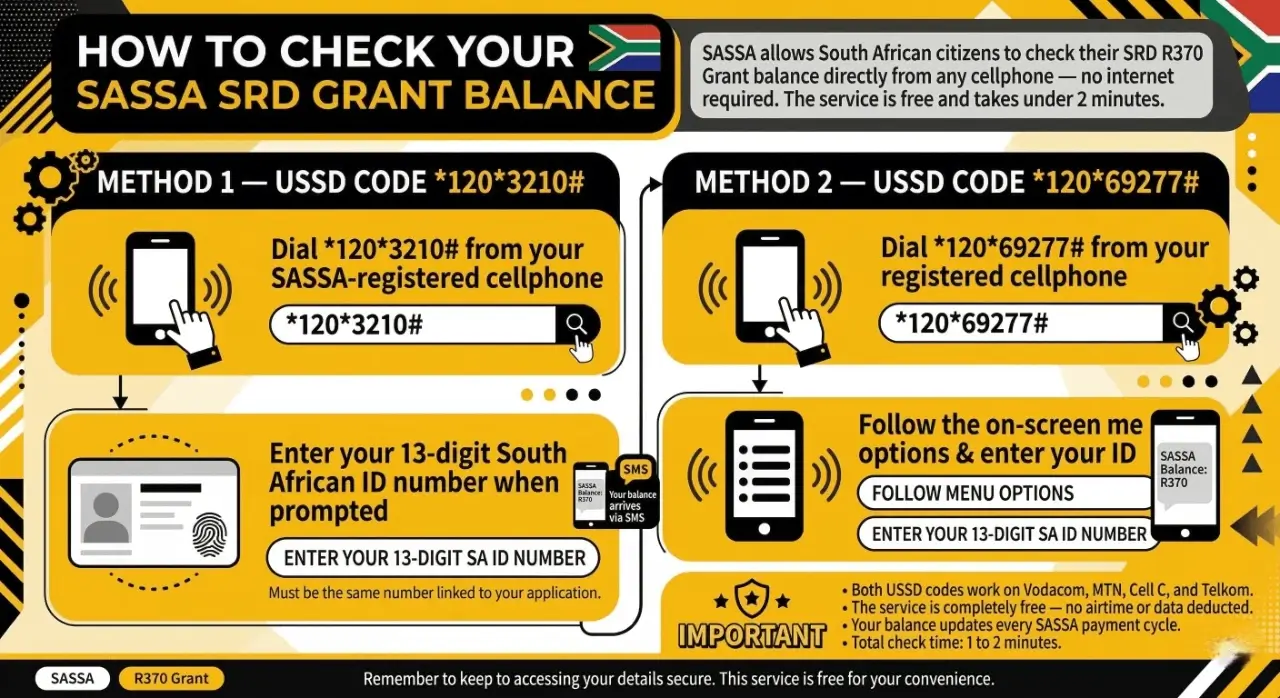
How to Check Your SASSA SRD Grant Balance on Your Phone?
SASSA allows South African citizens to check their SRD R370 Grant balance directly from any cellphone — no internet required. The service is free and takes under 2 minutes.
Method 1 — USSD Code *120*3210#
- Dial *120*3210# from your SASSA-registered cellphone
- Enter your 13-digit South African ID number when prompted
- Select “Check Balance” from the menu
- Your SRD R370 Grant balance arrives via SMS
Method 2 — USSD Code *120*69277#
- Dial *120*69277# from your registered cellphone
- Follow the on-screen menu options
- Enter your 13-digit South African ID number
- Your balance update arrives via SMS
Important:
- Both USSD codes work on Vodacom, MTN, Cell C, and Telkom
- The service is completely free — no airtime or data deducted
- Your balance updates every SASSA payment cycle
- Total check time: 1 to 2 minutes
How to Change Your SASSA Banking Details for SRD Grant in 2026?
To update your SASSA SRD R370 Grant banking details, follow these steps:
- Visit https://srd.sassa.gov.za
- Find the “How do I Change my Banking Details” section on the page
- Enter your 13-digit South African ID number
- SASSA sends a secure link to your registered cellphone via SMS
- Click the link and enter your new bank account details
- Submit and wait for a confirmation SMS from SASSA
Important:
- The bank account must be registered in your own name — SASSA does not pay into another person’s account
- Only use an active South African bank account
How to Change Your SASSA SRD Phone Number Online in 2026?
To update your registered cellphone number on the SASSA SRD R370 Grant system, follow these steps:
Step 1: Open the official page
Go to https://srd.sassa.gov.za/sc19/mobile-number-update. Enter your 13-digit ID number, your reason for updating, and your current payment method.
Step 2: Complete identity verification
SASSA will verify you are the original applicant. Follow all on-screen prompts carefully. Use good lighting and a clean camera lens. Too many failed attempts will temporarily lock your ID.
Step 3: Enter your new number
Type your new 10-digit South African mobile number and confirm it. SASSA sends an OTP to your new number. Enter the OTP to complete the update.
SASSA takes approximately 14 days to verify and activate your new cellphone number in the system. During this period, use your old number to check your SRD R370 Grant status at https://srd.sassa.gov.za/SC19/STATUS.
How to Appeal a Declined SASSA SRD Application?
If your SASSA SRD R370 Grant application is declined, you have the legal right to appeal under the South African Social Assistance Act. Submit your appeal within 90 days of the declined decision.
- Visit: https://srd.dsd.gov.za/appeals
- Enter: Your 13-digit South African ID number and registered cellphone number
- Receive OTP: Receive One-Time Pin OTP
- Choose: Your reason for appeal from the list provided
- Submit: Click Submit and keep your reference number
The Independent Tribunal for Social Assistance Appeals (ITSAA) reviews all SASSA SRD appeals independently from SASSA and aims to resolve cases within 60 to 90 days.
How to Check Your SASSA Appeal Status?
Checking your SASSA SRD R370 Grant appeal status uses the same portal and the same steps as submitting your appeal.
- Visit — https://srd.dsd.gov.za/appeals
- Enter — Your 13-digit South African ID number and SASSA-registered cellphone number
- OTP — Receive One-Time Pin OTP
- View — Your current appeal status appears on screen immediately
Who Qualifies for the SASSA SRD R370 Grant?
To qualify for the SASSA Social Relief of Distress R370 Grant, you must meet all criteria set by the Department of Social Development:
- Age: Between 18 and 59 years old
- Citizenship: South African citizen, permanent resident, or refugee with a valid permit
- Unemployment: Unemployed with no income
- No other grants: Not receiving any other SASSA grant
- No UIF: Not receiving UIF payments
- No NSFAS: Not a NSFAS-funded student
- Income threshold: Monthly income below R624
How to Reapply for the SASSA SRD R370 Grant? SASSA Reapplication Process
To reapply for SASSA SRD R370 grant or any other grant follow the below steps
- Visit https://srd.sassa.gov.za
- Enter your 13-digit South African ID number and SASSA-registered cellphone number
- Review and update your personal details — correct any changes to income, address, or banking information
- Read and accept SASSA’s terms and conditions
- Click Submit and save your reference number
SASSA SRD Status Shows Approved but No Payment Date — What Does It Mean?
Good news! Approved means SASSA accepted your SRD R370 Grant application. But seeing no payment date can feel confusing. Do not panic. It simply means your money is not ready to be released yet. SASSA still needs to complete a few final steps before your payment date appears.
Here is everything you need to know.
Why Is There No Payment Date?
1. Your bank details are still being checked
SASSA verifies every bank account with the relevant bank before sending money. This is a fraud prevention step. It takes a few extra days after approval.
2. You recently changed your payment method
Did you switch from cash collection to a bank account? Or update your banking details? Any change to your payment method takes time to process in the SASSA system.
3. Payments go out in batches
SASSA does not pay everyone on the same day. Payments go out in groups throughout the month. Your application may simply be sitting in the next batch.
4. Your final verification is still running
Even after approval, SASSA does one last check on your identity, income, and Department of Home Affairs records. Your payment date only appears once this final check is complete.
5. The system has not updated yet
Sometimes SASSA approves your application before the payment schedule catches up. Give it a few days and check again.
What Can You Do About It?
Check your banking details first
Log in to the official SASSA SRD portal at http://srd.sassa.gov.za and make sure your bank account number is correct. One wrong digit means no payment.
Wait 3 to 5 working days and check again
If no date shows today, do not stress. Check your status again in a few days. Payment dates appear in stages throughout the month.
Send “Status” on WhatsApp
Message 082 046 8553 on WhatsApp and type “Status”. This is the fastest way to see if a payment date has been added since your last check.
Try a retail pay point
Visit your nearest Checkers, Shoprite, or Pick n Pay with your South African ID document. Your grant may already be available for collection even if the date has not shown online yet.
Call SASSA directly
Dial 0800 60 10 11, Monday to Friday between 08:00 and 16:00. Ask the SASSA agent whether your payment has been scheduled and when it will reflect.
Check with your bank
If SASSA sent your payment but it has not appeared in your account, call your bank’s customer service line. The delay may be on the bank’s side, not SASSA’s.
Remember: An Approved status is always good news. A missing payment date is temporary. Your money is coming — it just needs a little more time to process.
Frequently Asked Questions
1. How do I check my SASSA SRD R370 Grant status?
Visit http://srd.sassa.gov.za/SC19/STATUS, enter your South African ID number and SASSA-registered cellphone number, then click Submit.
2. Why is my SASSA status still showing Pending?
SASSA cross-checks your details against SARS, UIF, and NSFAS databases. This can take several weeks. If it stays pending beyond 3 months, call SASSA on 0800 60 10 11. Also, during SASSA SRD R370 payment dates, a Pending status is also normal. SASSA temporarily shows Pending for 4 to 5 days while processing and releasing payments in batches.
3. What does a Declined SASSA status mean?
Your application did not meet the SRD R370 Grant eligibility criteria for that month. Common reasons include UIF income, NSFAS funding, or earnings above R624.
4. Can I Appeal a declined SASSA SRD application?
Yes. You have 90 days to appeal at https://srd.sassa.gov.za/sc19/appeals. The Independent Tribunal for Social Assistance Appeals (ITSAA) handles all reviews.
5. How long does SASSA take to approve an SRD application?
SASSA typically takes 3 to 4 weeks to process a new SRD R370 Grant application. During high-volume periods it can take longer.
6. Can I check my SASSA status without internet?
Yes. Dial *134*7737# on your registered cellphone. Works on all South African networks and is free.
7. What is the SASSA WhatsApp number for status checks?
The official SASSA WhatsApp number is 082 046 8553. Send the word “Status” to begin.
8. Why does my SASSA status say Application Not Found?
The details you entered do not match any SASSA record. Check your 13-digit South African ID number and the cellphone number you registered with SASSA.
9. How do I update my cellphone number with SASSA?
Visit https://srd.sassa.gov.za to update online, or go to your nearest SASSA office in person.
10. When does SASSA pay the SRD R370 Grant?
SASSA staggers payment dates each month. Watch the official SASSA website or wait for an SMS on your registered cellphone.
11. Is StatusCheckLive.co.za an official SASSA website?
No. StatusCheckLive.co.za is an independent information resource. The only official portal is http://srd.sassa.gov.za/SC19/STATUS.
12. What happens after my SASSA SRD application is approved?
SASSA sends an SMS to your registered cellphone with your payment date and collection method — bank deposit, SASSA Gold Card, or Post Office.
13. Can someone else check my SASSA status on my behalf?
No. Only use your own 13-digit South African ID number and registered cellphone number for security reasons.
14. What is the SASSA toll-free number?
The SASSA toll-free helpline is 0800 60 10 11, Monday to Friday, 08:00 to 16:00.
15. How do I re-apply for the SASSA SRD R370 Grant?
Visit https://srd.sassa.gov.za to submit a new SASSA SRD R370 Grant application online.
Contents
- 1 What Is SASSA Status Check?
- 2 How to Check Your SASSA SRD Status Online
- 3 What Does Your SASSA SRD Status Mean?
- 4 All SASSA SRD Status Meanings at a Glance
- 5 SASSA Status Check via Other Official Channels
- 5.1 1. SASSA Status Check via WhatsApp — 082 046 8553
- 5.2 2. SASSA Status Check via USSD — Dial *134*7737#
- 5.3 3. SASSA Status Check via Toll-Free Helpline — 0800 60 10 11
- 5.4 4. SASSA Status Check via Moya App — Data-Free Status Check
- 5.5 5. SASSA Status Check via SASSA Mobile App
- 5.6 6. SASSA Status Check via GovChat — Website or App
- 5.7 7. SASSA Status Check via SMS — 0600 123 456
- 5.8 8. SASSA Status Check via Partner Retail Stores — Shoprite, Pick n Pay
- 6 SASSA SRD R370 Grant Payment Dates
- 7 SASSA Payment Dates for 2026 to 2027
- 8 SASSA Payment Dates for June 2026
- 9 SASSA Payment Amount Increases for April 2026
- 10 SASSA Grant Types
- 10.1 1. Old Age Grant — R2,400 to R2,420/month
- 10.2 2. Disability Grant — R2,400/month
- 10.3 3. Care Dependency Grant — R2,400/month
- 10.4 4. War Veterans Grant — R2,420/month
- 10.5 5. Child Support Grant — R580/month per child
- 10.6 6. Foster Care Grant — R1,290/month per child
- 10.7 7. Grant in Aid — R580/month
- 10.8 8. Social Relief of Distress (SRD) R370 Grant
- 11 How to Check Your SASSA SRD Grant Balance on Your Phone?
- 12 Important:
- 13 How to Change Your SASSA Banking Details for SRD Grant in 2026?
- 14 How to Change Your SASSA SRD Phone Number Online in 2026?
- 15 How to Appeal a Declined SASSA SRD Application?
- 16 How to Check Your SASSA Appeal Status?
- 17 Who Qualifies for the SASSA SRD R370 Grant?
- 18 How to Reapply for the SASSA SRD R370 Grant? SASSA Reapplication Process
- 19 SASSA SRD Status Shows Approved but No Payment Date — What Does It Mean?
- 20 Frequently Asked Questions
- 20.1 1. How do I check my SASSA SRD R370 Grant status?
- 20.2 2. Why is my SASSA status still showing Pending?
- 20.3 3. What does a Declined SASSA status mean?
- 20.4 4. Can I Appeal a declined SASSA SRD application?
- 20.5 5. How long does SASSA take to approve an SRD application?
- 20.6 6. Can I check my SASSA status without internet?
- 20.7 7. What is the SASSA WhatsApp number for status checks?
- 20.8 8. Why does my SASSA status say Application Not Found?
- 20.9 9. How do I update my cellphone number with SASSA?
- 20.10 10. When does SASSA pay the SRD R370 Grant?
- 20.11 11. Is StatusCheckLive.co.za an official SASSA website?
- 20.12 12. What happens after my SASSA SRD application is approved?
- 20.13 13. Can someone else check my SASSA status on my behalf?
- 20.14 14. What is the SASSA toll-free number?
- 20.15 15. How do I re-apply for the SASSA SRD R370 Grant?