Your old number is gone, but your SASSA SRD R370 grant is still linked to it. No OTP means no access. No access means no payment. Here is exactly how to fix it, step by step.
How to Change Your SASSA SRD Phone Number in 2026? (Quick Answer)
Go to https://srd.sassa.gov.za/sc19/mobile-number-update, enter your 13-digit South African ID number, select your reason for updating, and confirm your current payment option. The system will then run an identity verification check before allowing any changes. Once verified, enter your new mobile number, confirm it, and enter the OTP sent to your new number. After the OTP is accepted, your new number is active on the SRD system.
Why Does Your SASSA Phone Number Matter?
The South African Social Security Agency (SASSA) uses your registered cell phone number for everything connected to your SRD R370 grant. Every OTP, payment notification, status update, and security alert goes to that number.
If your number is wrong, lost, or inactive, you cannot:
- Receive OTPs to log in or make changes
- Get payment confirmation SMS messages
- Check your grant status using the online portal
- Receive important SASSA announcements
Keeping your number active and updated is not optional — it directly controls your access to your grant.
What You Need Before You Start?
| Item | Details |
| South African ID number | 13-digit green barcoded ID or smart ID |
| SASSA Application ID | 6-digit reference number from your original application |
| New cell phone number | Active South African mobile number in your name |
| Access to new number | You must be able to receive the OTP on the new number |
If you do not have your Application ID, do not worry, there is a separate method covered below.
How to Change SASSA SRD Phone Number Online Using srd.sassa.gov.za?
Step 1: Open the Official SASSA Phone Number Update Page
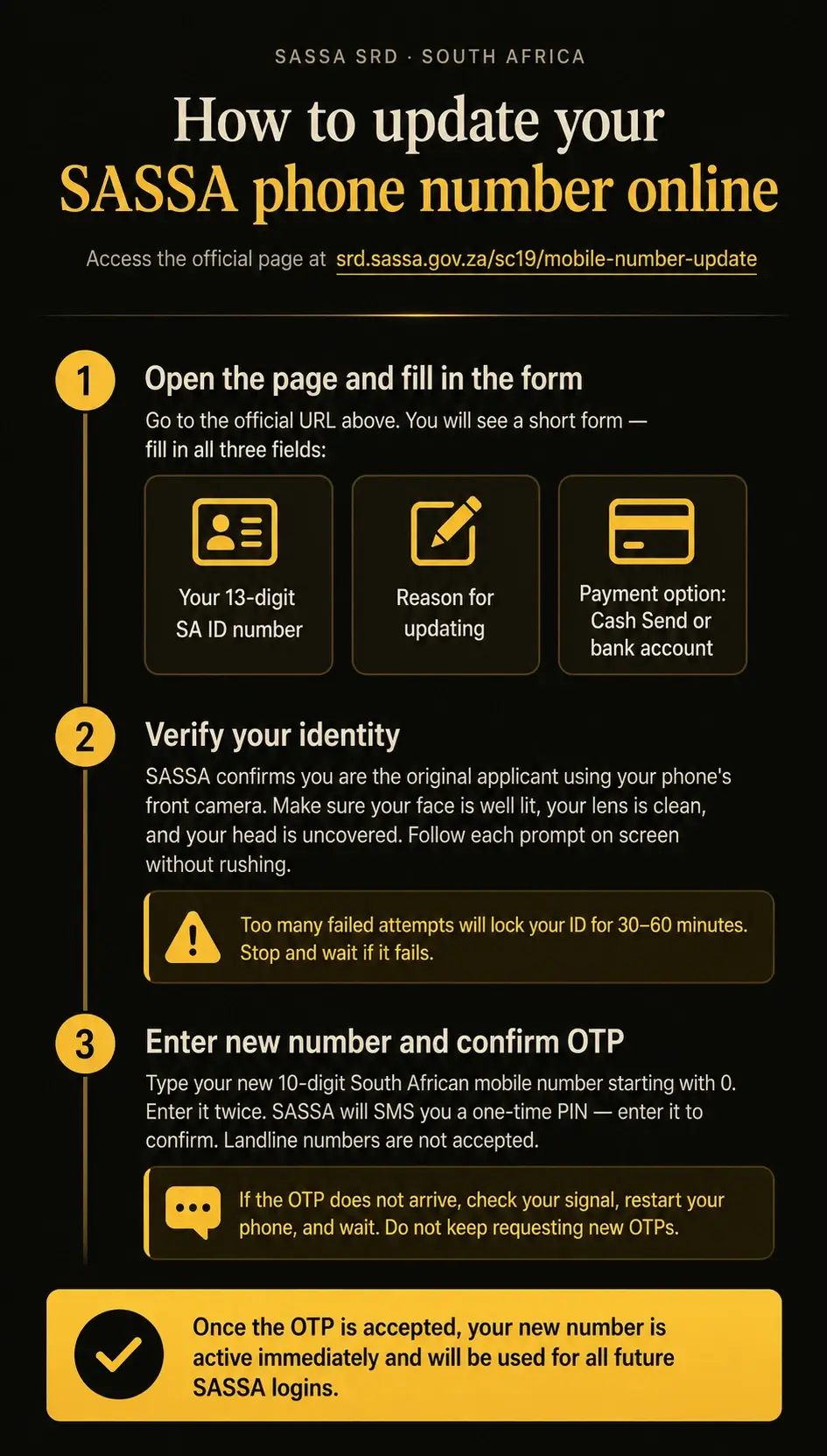
Go to https://srd.sassa.gov.za/sc19/mobile-number-update in your browser. This is the only official SASSA page for this task. Do not use any other website or third-party link.
Once the page loads, you will see a short form asking for three things:
- Your 13-digit South African ID number
- Your reason for updating the mobile number (for example: lost phone or changed number)
- Your current payment option — either Cash Send or Bank Account
Fill in all three fields correctly, then proceed.
Step 2: Pass the Identity Verification Check
After you submit the form, SASSA needs to confirm you are the original applicant. This is a required security step and cannot be skipped. The system will walk you through an identity verification process before it allows any number change.
This step works on both mobile and desktop. A smartphone with a working front camera tends to give the best results.
A few things that help you get through it smoothly:
- Use bright indoor lighting — avoid direct sunlight or dark rooms
- Remove hats or anything covering your face
- Wipe your camera lens clean before starting
- Follow each on-screen prompt carefully — do not rush
- Switch to mobile data if your Wi-Fi is unstable
Important: If you see a “Verification Interrupted” message or get blocked, stop immediately. Too many failed attempts in a short time can trigger a temporary lock on your ID number. Wait at least 30 to 60 minutes before trying again.
Step 3: Enter Your New Number and Verify With an OTP
Once identity verification is complete, the portal will ask you to enter your new mobile number. Type it in carefully, then confirm it by entering it a second time.
Your new number must be a valid 10-digit South African mobile number starting with 0. Landline numbers are not accepted.
SASSA will then send a One-Time PIN (OTP) via SMS to your new number. Enter that OTP on the page to confirm the number belongs to you.
If the OTP does not arrive:
- Check that your phone has a signal
- Restart your phone and wait a few minutes
- Do not keep requesting new OTPs back to back — this can trigger a temporary limit
Once the OTP is accepted, your new number is active. It will be used for all future logins and OTP verifications on the SASSA SRD system.
How to Change Your SASSA Phone Number on WhatsApp?
If the online portal is not working for you, WhatsApp offers a direct alternative.
- Save the SASSA WhatsApp number in your contacts: 0600 123 456
- Open WhatsApp and start a new chat with this number
- Send a greeting message like “Hello” to begin
- Type “Change Phone Number” when prompted
- SASSA will ask for your Application ID and current ID number
- Provide the details and follow the instructions
- SASSA will send you a secure link to update your number
This method works well when you still have temporary access to your old number or when someone can assist you.
How to Change Your SASSA Phone Number Without an Application ID?
Lost your Application ID? You have two options.
Option 1: Retrieve Your Application ID Online
Visit the official SASSA SRD status portal at srd.sassa.gov.za/sc19/status. Enter your ID number and registered phone number. Your Application ID appears in your status results. Write it down and then follow the standard steps above.
Option 2: Visit Your Nearest SASSA Office
If you cannot retrieve your Application ID online, go to your nearest SASSA office in person. Bring:
- Your South African ID book or smart ID card
- Any previous SASSA correspondence showing your grant details
At the office, tell the official you need to update your SRD phone number. They will fill in the details from their system and update your number without requiring you to provide the Application ID yourself. Many SASSA offices now have digital kiosks available for faster self-service updates.
How to Change Your SASSA Phone Number Without an OTP
SASSA requires OTP verification to protect your account. If you cannot receive the OTP because you lost access to your old number, you cannot complete the change online.
In this case, you must visit a SASSA office in person. Bring your:
- South African ID card or ID book
- Application ID if you have it
Explain to the SASSA official that you no longer have access to your registered number and cannot receive the OTP. They will verify your identity manually and update your number in the system. This is the safest and only accepted method when OTP access is unavailable.
How to Report SRD Lost Phone Number to SASSA?
If someone else changed your SASSA phone number without your permission or you your SRD phone number is lost, report it immediately.
- Go to srd.sassa.gov.za/sc19/auth
- Click on “Report Lost or Stolen Phone”
- Enter your 13-digit ID number
- Confirm the unauthorised number change
- Submit the report
- Follow the on-screen steps to secure your account and update your number
Report this as soon as possible. An unauthorised number change can result in someone else receiving your grant payment.
How to Fix an “Invalid” Phone Number Error on SASSA?
If you see an “invalid phone number” error when trying to update your details, check the following:
| Problem | Fix |
| Wrong format | SA numbers start with 0 and have 10 digits |
| Landline number entered | Use a mobile number only |
| Browser issue | Clear your cache or try a different browser |
| Device issue | Switch to a different phone or computer |
| Portal error | Try again after a few hours |
If the error continues after checking all of the above, call the SASSA helpline on 0800 60 10 11 for direct assistance.
How Long Does It Take to Change Your SASSA SRD Phone Number?
| Method | Processing Time |
| Online via srd.sassa.gov.za | Up to 14 working days |
| WhatsApp via 0600 123 456 | Up to 14 working days |
| In-person at a SASSA office | Can be faster — sometimes same day |
| High-demand periods | Up to 40 working days |
Always update your number well before your expected SASSA payment date to avoid delays.
Conclusion
Changing your SASSA SRD R370 phone number in 2026 is straightforward when you use the right channel. The fastest method is online at https://srd.sassa.gov.za/sc19/mobile-number-update using your ID number and Application ID. If you lost your number or cannot receive an OTP, visit your nearest SASSA office with your ID.
You can also use WhatsApp on 0600 123 456 for guided assistance. Update your number as soon as possible, your grant payment and account security depend on it.
Frequently Asked Questions
1. How do I change my SASSA SRD phone number in 2026?
Go to https://srd.sassa.gov.za/sc19/mobile-number-update, enter your ID number and Application ID, select the phone number change option, enter your new number, verify with the OTP, and submit. Processing takes up to 14 working days.
2. What if I do not have my SASSA Application ID?
Check your Application ID by visiting srd.sassa.gov.za/sc19/status and entering your ID number. If you still cannot find it, visit your nearest SASSA office with your ID card.
3. Can I change my SASSA Phone number without an OTP?
No, you cannot change it online without an OTP. If you have no access to your registered number, visit a SASSA office in person with your South African ID for manual verification.
4. How long does SASSA Take to Update a phone number?
SASSA takes up to 14 working days to process a phone number change. During high-demand periods, it can take up to 40 working days.
5. Can I Change my SASSA number using WhatsApp?
Yes. Save 0600 123 456 as a contact, open WhatsApp, send “Hello”, then follow the prompts to request a phone number change.
6. Is there a fee to Change my SASSA phone number?
No. SASSA does not charge any fee to update your contact details. Anyone asking you to pay for this service is running a scam.
7. What Happens if Someone Changed my SASSA number without my permission?
Report it immediately at srd.sassa.gov.za/sc19/auth by clicking “Report Lost or Stolen Phone”. Submit the report and follow the steps to secure your account.
8. Can I use a Family Member’s Phone Number for my SASSA SRD grant?
No. You must use a mobile number that you personally own and have direct access to. Using someone else’s number creates security risks and may lead to payment problems.
Contents
- 1 How to Change Your SASSA SRD Phone Number in 2026? (Quick Answer)
- 2 Why Does Your SASSA Phone Number Matter?
- 3 What You Need Before You Start?
- 4 How to Change SASSA SRD Phone Number Online Using srd.sassa.gov.za?
- 5 How to Change Your SASSA Phone Number on WhatsApp?
- 6 How to Change Your SASSA Phone Number Without an Application ID?
- 7 How to Change Your SASSA Phone Number Without an OTP
- 8 How to Report SRD Lost Phone Number to SASSA?
- 9 How to Fix an “Invalid” Phone Number Error on SASSA?
- 10 How Long Does It Take to Change Your SASSA SRD Phone Number?
- 11 Conclusion
- 12 Frequently Asked Questions
- 12.1 1. How do I change my SASSA SRD phone number in 2026?
- 12.2 2. What if I do not have my SASSA Application ID?
- 12.3 3. Can I change my SASSA Phone number without an OTP?
- 12.4 4. How long does SASSA Take to Update a phone number?
- 12.5 5. Can I Change my SASSA number using WhatsApp?
- 12.6 6. Is there a fee to Change my SASSA phone number?
- 12.7 7. What Happens if Someone Changed my SASSA number without my permission?
- 12.8 8. Can I use a Family Member’s Phone Number for my SASSA SRD grant?