Your SASSA SRD R370 Grant payment went to the wrong account or stopped completely. That means no money this month. Here is exactly how to fix your banking details fast, using the correct official channels.
How to Change Your SASSA SRD Banking Details in 2026? (Quick Answer)
Go to srd.sassa.gov.za, scroll to the banking details section, enter your 13-digit South African ID number, click the secure SMS link sent to your registered number, enter your new bank account details, and submit. SASSA will send a confirmation SMS within a few days. Always use a bank account in your own name.
Why Do SASSA Banking Details Need Updating?
Many SRD R370 grant recipients miss payments simply because their banking details are outdated or incorrect. This happens more often than people realise. Common reasons you may need to update your SASSA banking details include:
- You opened a new bank account and closed the old one
- Your account was frozen or suspended by your bank
- You switched from one bank to another, for example from Capitec to TymeBank
- You entered the wrong account number during your original application
- Your bank account is not in your own name
SASSA only deposits your SRD grant into a bank account that belongs to you personally. If the account details on record do not match an active, valid account in your name, your payment will fail.

What You Need Before You Start?
Before you update your SASSA SRD banking details, make sure you have the following ready:
| Item | Details |
| South African ID number | 13-digit green barcoded ID or smart ID card |
| Registered mobile number | The same number linked to your SASSA application |
| New bank account details | Account number, bank name, and account type |
| Active bank account | Must be in your own name |
Do not use someone else’s account. SASSA cross-checks account ownership with banking institutions. Using another person’s account will result in your payment being blocked.
How to Change Your SASSA SRD Banking Details Online on srd.sassa.gov.za
The fastest and easiest way to update your SASSA SRD R370 banking details is through the official SASSA SRD website. Follow these steps carefully.
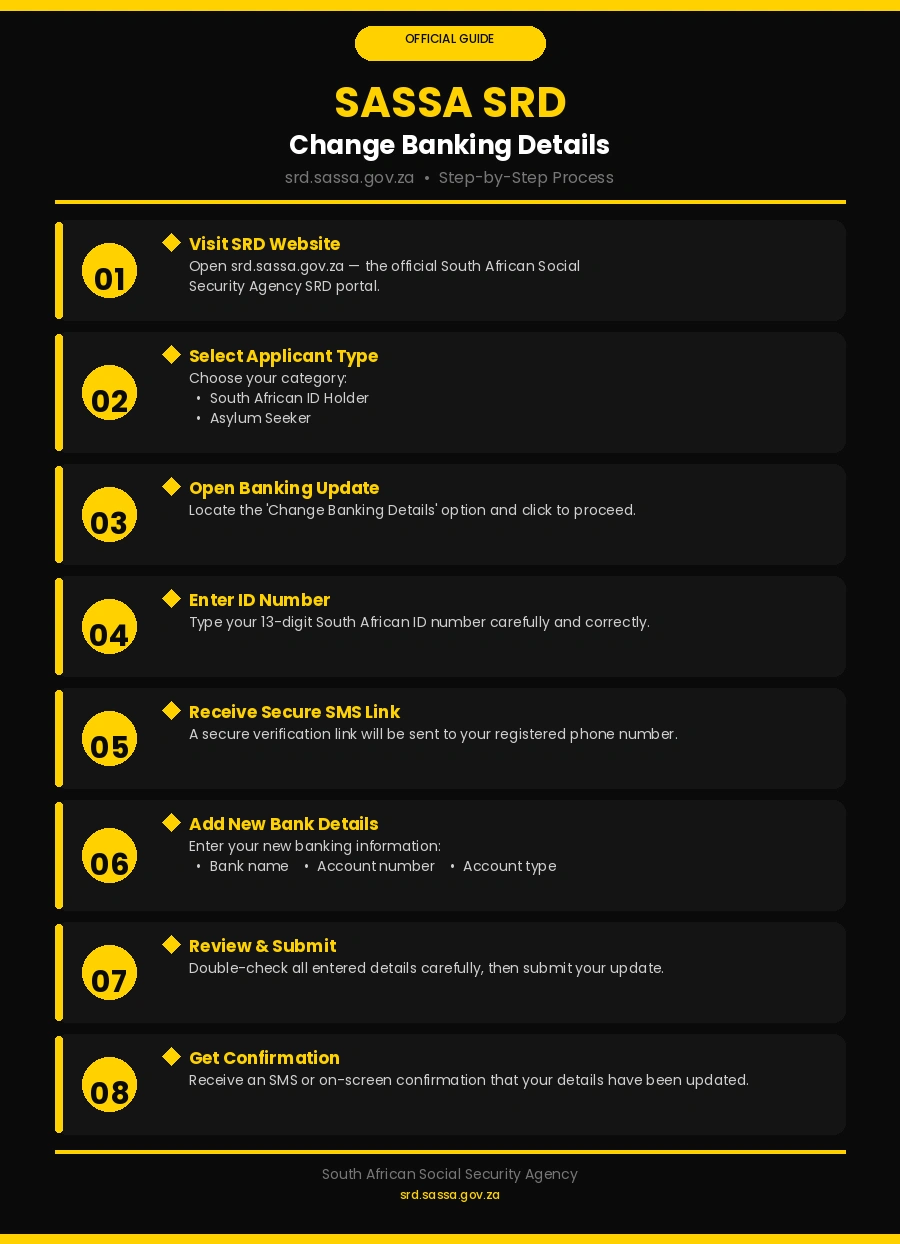
Step 1: Open the Official SASSA SRD Website
Open your browser and go to srd.sassa.gov.za. This is the only official website for SRD grant banking updates. Do not use any other website. Fake websites exist that steal your personal information and banking details.
Step 2: Select Your Applicant Type
On the homepage, you will see two options:
- South African ID Holder
- Asylum Seeker
Click the option that matches your legal status in South Africa.
Step 3: Find the Banking Details Section
Scroll down the page until you see the section that says “How do I change my banking details?” Click on it to open the update process.
Step 4: Enter Your ID Number
Type in your full 13-digit South African ID number. Check every digit before you click submit. A single wrong number will block the process and may delay your payment.
Step 5: Wait for the Secure SMS Link
After submitting your ID number, SASSA will send a secure link via SMS to your registered mobile number. This link expires quickly, so open it as soon as it arrives on your phone.
Step 6: Enter Your New Banking Details
The secure link opens an official SASSA page. Enter the following information:
- Bank name — for example Capitec, Absa, Standard Bank, Nedbank, FNB, or TymeBank
- Account number — double-check every digit
- Account type — savings or cheque
Step 7: Review Everything Before Submitting
Read through all the details you entered. Make sure the account number is correct and that the account belongs to you. Once you are satisfied, click “Submit”.
Step 8: Receive Your Confirmation
SASSA will send you either an on-screen confirmation or a confirmation SMS. Keep this as proof that your update was submitted. Changes generally take 5 to 7 working days to take effect. To be safe, submit your update at least 10 days before your expected payment date.
How to Change SASSA Banking Details Using the Call Centre?
Do not have reliable internet access? You can call SASSA directly and update your banking details over the phone.
- Call the SASSA toll-free helpline: 0800 60 10 11
- Select the option for SRD grant enquiries
- Tell the agent you want to update your banking details
- Provide your ID number and answer the security questions
- Give your new bank name, account number, and account type
- Ask for a reference number before ending the call
The SASSA call centre operates Monday to Friday, 8:00 AM to 4:00 PM. Lines can be busy, so call early in the morning for shorter waiting times.
How to Change SASSA Banking Details at a SASSA Office?
If you prefer speaking to someone in person, visit your nearest SASSA office. This option takes longer but allows you to ask questions directly.
What to bring with you:
- Your South African ID book or smart ID card
- Proof of your new bank account — a bank statement or a letter from your bank works
- Your registered mobile phone
At the office, go to the general enquiries queue and tell the official you need to update your SRD grant banking details. Fill in the form they give you. Ask for a stamped copy of your submission before you leave. Keep it somewhere safe.
How to Change SASSA Banking Details to TymeBank?
TymeBank has become a popular choice for SASSA SRD recipients because it has no monthly fees and allows free cash withdrawals at Pick n Pay and Boxer stores across South Africa. Changing your grant payment to TymeBank is simple.
First, make sure your TymeBank account is active and fully verified. Then follow these steps:
- Go to srd.sassa.gov.za
- Open the “How do I change my banking details?” section
- Enter your 13-digit ID number
- Click the secure link sent to your phone
- Select TymeBank from the list of banks
- Enter your TymeBank account number
- Select savings as your account type
- Submit and wait for confirmation
TymeBank accounts are available at kiosks inside Pick n Pay and Boxer stores nationwide. You can open one in under five minutes using your fingerprint and ID.
How to Update SASSA Banking Details Using the Moya App
The Moya App offers a zero-data way to manage your SASSA SRD grant from your phone. You do not need airtime or data to use it, which makes it ideal for many South Africans.
Here is how to update your banking details using Moya:
- Download the Moya App from the Google Play Store or App Store
- Log in using your SASSA registered details
- Tap on “SASSA Services”
- Select “Update Banking Details”
- Enter your new bank name, account number, and account type
- Review the details and tap “Submit”
- Wait for the in-app confirmation
The Moya App also lets you check your SASSA payment dates and application status, all without using your data.
What If You Entered Wrong Banking Details?
Mistakes happen. If you submitted incorrect banking details, act immediately. Do not wait.
- Log back into srd.sassa.gov.za as soon as possible
- Go to the banking details section and check what was submitted
- If the details are wrong, click “Update” and enter the correct information
- If the website does not allow you to make changes, call 0800 60 10 11 right away
The sooner you fix the error, the lower the chance of a missed payment. Always check your account number three times before submitting any update.
How Long Does SASSA Take to Update Banking Details?
Once you submit your new banking details, SASSA takes between 5 and 7 working days to process the update. In some cases it may take up to 10 working days.
To avoid missing a payment:
- Submit your update at least 10 days before your payment date
- Check your SASSA payment status at srd.sassa.gov.za/sc19/status after the update
- If payment does not reflect after 10 working days, contact the SASSA helpline on 0800 60 10 11
Common Banking Details Update Mistakes to Avoid
| Mistake | What Happens | How to Avoid It |
| Wrong account number | Payment fails or goes to wrong account | Check every digit twice |
| Account not in your name | SASSA blocks the payment | Only use your own account |
| Using a closed account | Payment bounces back | Confirm your account is active |
| Updating too close to payment date | Change does not process in time | Submit 10 days early |
| Using unofficial websites | Personal details get stolen | Only use srd.sassa.gov.za |
How to Protect Your SASSA Banking Details From Scams?
Scammers target SASSA grant recipients. They create fake websites, send fake SMS messages, and make fake phone calls pretending to be SASSA officials. Protect yourself by following these rules:
- SASSA will never ask for your PIN or password via SMS or phone
- Always check that the website address starts with srd.sassa.gov.za
- Do not click links sent to you by strangers claiming to be from SASSA
- Report suspicious activity to the SASSA fraud hotline: 0800 601 011
- Never pay anyone to update your banking details — SASSA charges nothing for this service
Conclusion
Updating your SASSA SRD R370 banking details in 2026 is free, straightforward, and takes just a few minutes online at srd.sassa.gov.za. You can also do it via the SASSA call centre on 0800 60 10 11, at your nearest SASSA office, through the Moya App, or by changing to a bank like TymeBank. Always use a valid account in your own name, submit updates at least 10 days before your payment date, and never share your details with third parties. Keep your banking information current so your grant reaches you every month without fail.
Frequently Asked Questions
1. How do I change my SASSA SRD banking details in 2026?
Go to srd.sassa.gov.za, open the banking details section, enter your 13-digit ID number, click the secure SMS link, enter your new account details, and submit. You can also call 0800 60 10 11 or visit a SASSA office.
2. How long does SASSA take to update banking details?
SASSA typically processes banking detail updates within 5 to 7 working days. Allow up to 10 working days to be safe, and always submit changes before your expected payment date.
3. Can I change my SASSA banking details to TymeBank?
Yes. TymeBank is an accepted bank for SASSA SRD payments. Open a TymeBank account at any Pick n Pay or Boxer store kiosk and then update your details on srd.sassa.gov.za.
4. Does SASSA Charge a fee to update banking details?
No. SASSA does not charge any fee to update your banking details. If anyone asks you to pay for this service, it is a scam.
5. Can someone else update my SASSA banking details for me?
No. Only the grant recipient can update their own banking details. This protects your grant from fraud and unauthorised changes.
6. What happens if I Enter the Wrong Banking details on SASSA?
Log back into srd.sassa.gov.za immediately and correct the information. If you cannot fix it online, call 0800 60 10 11 right away to avoid a missed payment.
7. Can I Update my SASSA banking details using the Moya App?
Yes. Download the Moya App, tap on SASSA Services, select Update Banking Details, enter your new account details, and submit. The app works without data or airtime.
8. What bank account can I use for my SASSA SRD R370 grant?
You can use any South African bank account in your own name, including Capitec, Absa, FNB, Standard Bank, Nedbank, and TymeBank. SASSA does not accept accounts belonging to another person.