Your R370 grant was cancelled. The SMS came without warning. Now you’re wondering if that money is gone for good it’s not. SASSA allows reinstatement, but only if you act correctly and fast.
Quick Answe: To reinstate a cancelled SASSA SRD R370 grant in 2026, visit https://srd.sassa.gov.za/sc19/reinstate, log in with your ID and cellphone number, click “Reinstate My Canceled Application,” update your details, and submit. SASSA will SMS you the outcome within weeks.
Can You Still Get Your SRD R370 Grant Back in 2026?
Yes, you can. The South African Social Security Agency (SASSA) gives applicants a chance to reinstate a cancelled Social Relief of Distress (SRD) grant but there are conditions.
You cannot simply reapply and expect approval. You must meet the current 2026 eligibility rules and use the correct reinstatement process on the official SASSA SRD portal.
Many South Africans lose their grant due to outdated banking details, missed verifications, or income checks that flagged incorrect data. In most of these cases, reinstatement is possible.
Do You Still Qualify? Check the 2026 SRD R370 Eligibility Criteria First
Before you attempt reinstatement, confirm that you still meet every requirement. Submitting without qualifying wastes your time and delays the process.
| Eligibility Requirement | Details |
| Age | 18 to 59 years old |
| Citizenship | SA citizen, permanent resident, or refugee/asylum seeker with valid file number |
| Employment Status | Unemployed |
| Monthly Income | Below R624 per month |
| Other Grants | Must not receive any other SASSA grant (child support grant is the exception) |
| Government Funding | Not funded by NSFAS, UIF, or any government subsidy |
If you tick every box above, you are eligible to request reinstatement. You can also verify your situation directly at srd.sassa.gov.za.
How to Reinstate Your Cancelled SASSA SRD Application?
Step-by-Step Reinstatement Process
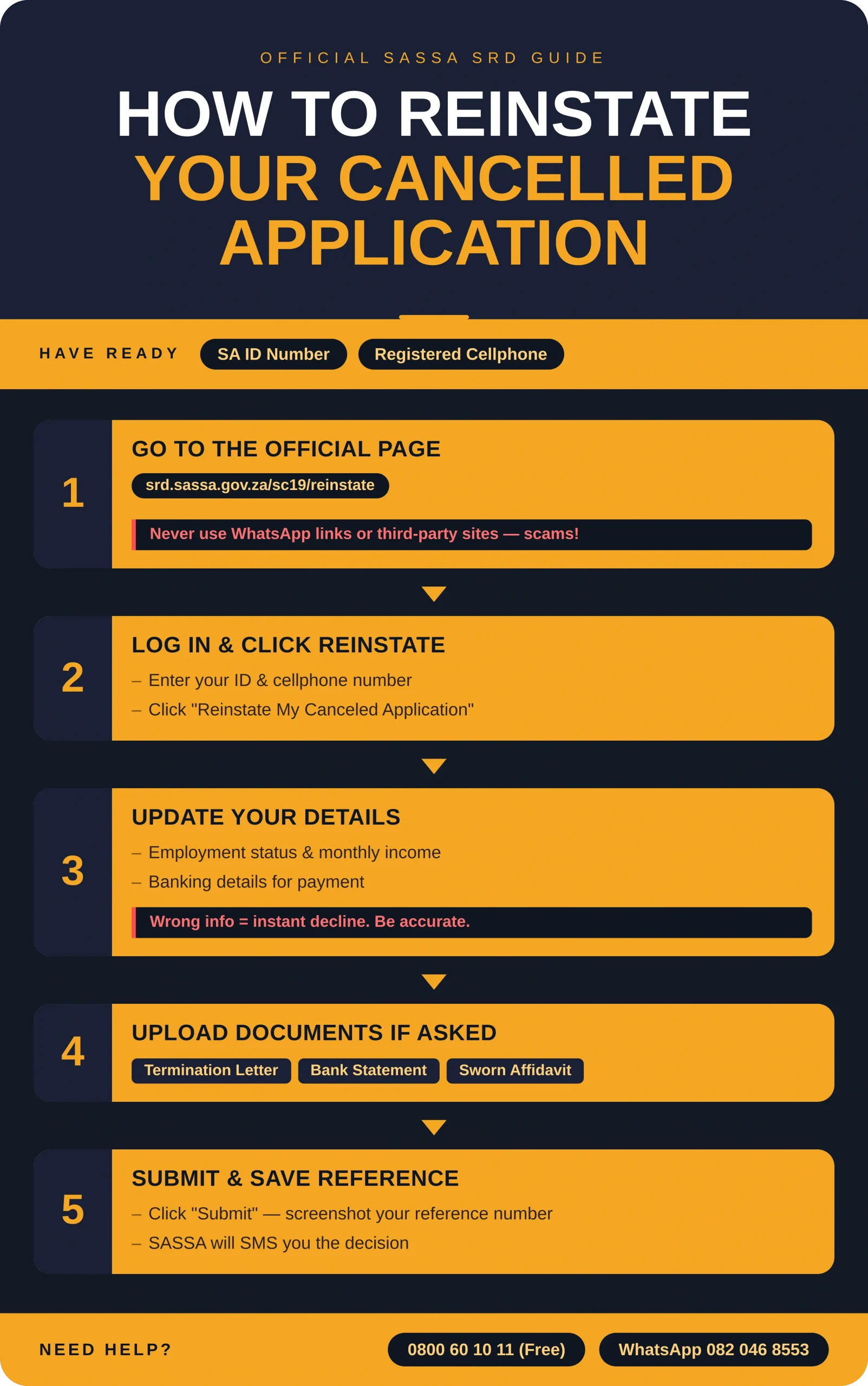
Before you start, have these two things ready:
- Your South African ID number
- The cellphone number you used when you first applied
Step 1: Go to the Official SASSA Reinstatement Page
Open your browser and go directly to: https://srd.sassa.gov.za/sc19/reinstate
Do not use third-party websites or WhatsApp links claiming to offer reinstatement — these are often scams. Always use the official SASSA portal.
Step 2: Log In and Find the Reinstatement Button
Enter your ID number and registered cellphone number to access your account. Once you are in, look for the button that says “Reinstate My Canceled Application” and click it.
Step 3: Review and Update Your Personal Details
SASSA will ask you to confirm or correct your current information. This may include:
- Your employment status
- Your monthly income
- Your banking details for payment
If your situation has changed since your original application, update everything accurately. Incorrect information is one of the top reasons reinstatement requests get declined.
Step 4: Upload Supporting Documents If Required
Depending on your case, SASSA may ask for documents such as:
- A termination letter from a previous employer
- A bank statement showing your current income level
- A sworn affidavit confirming unemployment or low income
Upload clear, legible copies of whatever is requested.
Step 5: Submit and Save Your Reference Number
Once all details are correct, click “Submit.” SASSA will generate a reference number. Write it down or screenshot it. You will need it to track your reinstatement status.
SASSA will contact you via SMS once a decision has been made.
How to Track Your SRD Reinstatement Status?
You do not need to call anyone to check progress. Use the official SRD Status checker:
- Visit https://srd.sassa.gov.za/sc19/status
- Enter your ID number and cellphone number
- Click Submit
- Your status will show as approved, pending, or rejected
Check back regularly, especially in the weeks after submission.
What to Do If Your Reinstatement Is Rejected?
A rejection is not always final. Here is how to handle it properly.
First, find the reason. Log in to the SASSA portal and read the rejection message carefully. Common reasons include:
- Income above the R624 monthly threshold
- Incomplete or incorrect personal information
- Duplicate records or identity verification issues
- Receipt of funds from UIF, NSFAS, or other government sources
Second, fix what you can. If the problem is incorrect details, update them on the portal and resubmit. If your income dropped recently, provide proof such as a bank statement or termination letter.
Third, file a formal appeal if you believe the rejection was wrong.
How to Appeal a Rejected SRD Reinstatement?
Filing an Appeal Through the DSD Platform
The Department of Social Development (DSD) manages SRD appeals through a separate platform. Here is how to use it:
- Go to https://srd.dsd.gov.za/appeals
- Enter your ID number and cellphone number
- Fill in the appeal form honestly and completely
- Upload any new or missing documents that support your case
- Click Submit and save your appeal reference number
You can track the outcome on the same DSD appeals platform. The process typically takes up to six weeks. If approved, your grant will be reinstated. If denied again, that decision is generally final.
Other Help If You No Longer Qualify
If reinstatement is not possible, do not give up on support entirely. Contact SASSA’s toll-free helpline at 0800 60 10 11 or visit your nearest SASSA office. You may qualify for other assistance such as:
- Older Persons Grant (if you are approaching 60)
- Care Dependency Grant
- Social Relief food parcels during periods of hardship
Conclusion
Getting your SASSA SRD R370 grant reinstated in 2026 is possible if you still meet the eligibility criteria and follow the correct steps on the official portal. Act quickly, keep your details accurate, and save every reference number you receive. If rejected, use the DSD appeals platform before assuming it is over.
Frequently Asked Questions
1. How long Does SASSA Take to Process a Reinstatement request?
Processing times vary, but most applicants receive an SMS response within two to four weeks after submitting a reinstatement request.
2. Can I Reinstate my SRD grant if I missed the original appeal deadline?
If the appeal window has closed, reinstatement through the standard portal may still be available. Visit srd.sassa.gov.za to check your current options.
3. What Happens to my Back Payments After Reinstatement?
SASSA does not always pay backdated amounts automatically. You may need to follow up directly with SASSA if payments for missed months are not reflected.
4. Do I Need a Smartphone to Apply for Reinstatement?
No. You can use any internet-enabled device, including a basic phone browser, or visit a SASSA office or a local library with internet access.
5. Can Someone else Reinstate my SRD grant on my behalf?
No. The reinstatement process requires your personal ID number and the cellphone number linked to your application. Only you can complete it.
6. What Documents do I Need for SRD reinstatement?
Typically your ID number and cellphone number are enough to start. SASSA may request a bank statement, termination letter, or affidavit depending on your specific case.
7. Will my Grant Resume at R370 Per Month After Reinstatement?
Yes. The current SRD grant amount is R370 per month. This amount applies once your reinstatement is approved, subject to monthly means-testing.
8. What if my Cellphone Number has Changed Since I First Applied?
Contact SASSA directly on 0800 60 10 11 to update your registered cellphone number before attempting reinstatement online.